Imagine you leave for work and then remember that the heater is still on, the front door is unlocked, and the garage light is blazing. A few years ago, you had to drive back home to fix all three. Today, one tap on your phone solves every problem in seconds. That small moment explains why home automation systems are growing fast across Melbourne. These setups link your lights, locks, cameras, switches, and sensors, so you control them from one app, one voice command, or one automatic schedule. They make a house safer, cheaper to run, and much easier to live in.
This guide explains how home automation systems work, which types you can choose, and what benefits and limits you should expect. You will also learn how to plan a setup, which mistakes to avoid, and how to pick the right installer. Whether you own a new build or an older family home, you will finish this article with a clear plan.
What Are Home Automation Systems?
Home automation systems are groups of smart devices that work together inside one property. A single smart bulb is a gadget. A system joins that bulb with a door lock, a doorbell, a camera, and a control app, so each device reacts to the others. When you say “good night,” the system locks the doors, switches off the lights, and arms the alarm. Its home automation services in Melbourne cover lighting, locks, doorbells, voice control, and remote monitoring
Many people mix up the terms “smart home” and “home automation.” A smart home is the big idea of a connected house. Automation is the part where devices act on their own, based on schedules, sensors, or your commands. A smart plug that you switch by phone is smart. A plug that turns on a lamp at sunset without your help is automated.
How Home Automation Systems Work
Every system follows the same simple loop: sense, decide, and act. A sensor notices something, such as movement in the hallway. A controller decides what to do with that information. An actuator, such as a switch or a lock motor, then carries out the action.
Here is a real example. A motion sensor sees you walk into the kitchen at night. The controller checks the time and the light level. It then tells the downlights to switch on at a soft brightness. You never touch a switch, and the whole process takes less than a second.
The Main Parts of a System
Most home automation systems share five core parts. The table below shows what each part does and gives a simple example.
| Part | What It Does | Everyday Example |
|---|---|---|
| Sensors | Detect movement, open doors, light, or temperature. | A contact sensor on the back door |
| Controller or hub | Receives signals and decides what happens next | A hub in the living room |
| Actuators | Carry out the action. | A smart switch, lock motor, or gate motor |
| Network | Carries messages between all parts | Wi-Fi, wired cable, or Zigbee radio |
| App or voice assistant | Let you give orders and see the status. | A phone app or smart speaker |
Why Melbourne Homes Suit Home Automation
Melbourne has its own rhythm. The weather swings from warm days to cold nights, sometimes within one afternoon. Families run busy schedules, and many people work from home for part of the week. Home automation systems fit that lifestyle well because they handle small jobs without asking for your time.
Weather and Energy Use
Heating and cooling often take up a large share of a home’s power use. Automated schedules stop heaters, fans, and lights from running when nobody needs them. Sensors can also switch off lights in empty rooms. Over a full year, those small savings add up.
Busy Lifestyles and Older Homes
Many Melbourne suburbs have older houses with limited wiring and weak Wi-Fi corners. Wireless and hybrid options let owners add automation without opening every wall. Newer homes give you more freedom, because you can plan cables and switches from day one. Both paths lead to a good result when you plan well.
Main Types of Home Automation Systems
Not all home automation systems use the same technology. The type you choose decides your cost, your reliability, and how easily you can expand later. Three types cover most homes, and a fourth choice, where the system keeps its brain, matters just as much.
Wired Systems
A wired system sends signals through cables. It gives the most stable connection and does not depend on Wi-Fi strength. Installers usually fit wired parts during a build or a major renovation, because running cables through finished walls takes extra time. The trade-off is a higher upfront cost.
Wireless Systems
Wireless systems use Wi-Fi, Zigbee, Z-Wave, or Matter. They install faster and suit existing homes well. Battery sensors and plug-in devices need no new cabling. However, a weak signal or a crowded network can cause delays or dropped connections.
Hybrid Systems
A hybrid system mixes both methods. Installers wire the key parts, such as cameras, access points, and main switches, and they use wireless links for sensors and small devices. Many professionals recommend this approach because it balances cost, speed, and reliability.
| Type | Best For | Main Advantage | Main Drawback |
|---|---|---|---|
| Wired | New builds and renovations | Very stable connection | Higher cost and more planning |
| Wireless | Existing homes and apartments | Fast and flexible | Depends on signal quality |
| Hybrid | Most family homes | Balanced cost and reliability | Needs careful design |
Hub-Based and Cloud-Based Control
A hub-based setup keeps decisions inside your home, so many routines keep working when the internet drops. A cloud-based setup sends data to company servers, which makes setup easier but adds reliance on the internet. Local control also helps privacy, because less data leaves your house. Choose home automation systems with local control for the jobs that matter most, such as door locks and alarms.
What Home Automation Systems Can Control
Modern setups reach almost every part of your home. The areas below give the most value for most families.
Smart Lighting
Smart lighting is the most popular starting point. You can dim lights, set scenes, and create schedules. Many people use a movie scene or a dinner scene to change the mood of a room with one tap. Lights can also follow sunrise and sunset, so your home never sits in the dark.
Smart Locks and Doorbells
Smart locks let you open the door with a code, a card, a fingerprint, or your phone. You can give visitors a temporary code that expires after the visit. A smart doorbell shows who stands outside and lets you speak through your phone, even when you are away from home.
Cameras, Alarms, and Intercoms
Security devices work best when they talk to each other. A door sensor can trigger a camera to record, and an alarm can switch on every light in the house. Modern cameras also use AI motion detection, which cuts alerts caused by animals or passing cars.
Voice Control
Voice control links your system to speakers and phones. You can ask for lights, locks, or scenes without reaching for a remote. It helps children, older relatives, and anyone carrying shopping bags.
Remote Monitoring
Remote monitoring lets you check your property from anywhere. You can view live camera feeds, see which doors are open, and read alerts. This feature gives real peace of mind during holidays and long workdays.
Benefits of Home Automation Systems
The real value of automation shows up in daily life. These benefits come up most often when owners explain why they would never go back.
Everyday Convenience
Routines remove repeat tasks. One leaving-home button can lock the doors, switch off the lights, and arm the alarm. You save a few minutes every day, and you stop worrying about forgotten jobs.
Lower Energy Waste
Schedules and sensors cut the time that lights and appliances run for no reason. Smart lighting dims or switches off when a room sits empty. These habits reduce waste without changing how you live.
Stronger Security
Automation turns separate devices into a team. A camera, a lock, and an alarm that share information respond faster than three separate products. You get alerts within seconds and see exactly what happened.
Comfort for Every Age
Families with young children, older relatives, or people with limited movement gain more independence. Voice commands, automatic lights, and video doorbells reduce effort and risk.
Better Property Appeal
Buyers and tenants often like a home that already has smart lighting, secure entry, and a strong network. Results vary, but a tidy, well-planned setup makes a property feel modern and cared for.
Disadvantages and Limits to Know
No technology is perfect, and a balanced view helps you decide with confidence. The table below sets the advantages next to the disadvantages.
| Advantages | Disadvantages |
|---|---|
| Control from anywhere | Needs a stable internet connection for remote access |
| Faster security alerts | Higher upfront cost for quality equipment |
| Less wasted power | Brands may not work together. |
| Simple daily routines | Privacy and password risks |
| Easy to expand over time | A short learning curve for new users |
Poor planning causes most of these problems, not the technology itself. A professional design, a strong network, and a clear list of goals reduce nearly all of them.
Wired or Wireless: Which Option Suits Your Home?
Your building decides much of this choice. A new build gives you open walls, so you can run cables and place switches in the best spots. An older home or an apartment usually calls for wireless devices or a hybrid design.
New Builds and Major Renovations
Plan early. Ask your builder or electrician to include data cabling, extra power points, and conduit for future cables. Adding these items later costs more time and money, and it often means cutting into finished walls.
Existing Homes
Many home automation systems for older houses start wireless. Smart switches, smart lighting, and wireless sensors give strong results without major work. Later, you can add wired parts wherever walls are open during a renovation.
Apartments and Rentals
Check strata rules and landlord permission before you change locks or drill holes. Plug-in devices, smart bulbs, and voice assistants need no changes to the property, and you can take them with you when you move.
Why Your Network Decides Everything
Home automation systems depend on a strong network more than on any app. A router that handles two phones can struggle when forty devices join it. Weak Wi-Fi is the biggest cause of failed routines, slow cameras, and locks that respond late.
Wi-Fi Coverage and Access Points
Walk around your property and test the signal where you plan to place each device. Backyard cameras and far-door locks often sit in weak zones. Adding access points in the right places fixes most of these problems.
Wired Cabling and PoE
Power over Ethernet, known as PoE, sends power and data through one cable. A camera or access point then needs no nearby power point. A PoE switch collects those cables in one place and keeps the connection steady.
Routers and Firewalls
A quality router and a firewall protect your devices from outside threats. Good networking also lets you place smart devices on their own network, away from laptops and phones. That step limits the risk if one device has a weakness.
Choosing the Right Protocol
Devices talk to each other in different languages. The table below compares the four you will meet most often.
| Protocol | Strength | Best For | Limit |
|---|---|---|---|
| Wi-Fi | Needs no hub | Simple setups and cameras | Can crowd the network |
| Zigbee | Low power and strong mesh | Sensors and lights | Needs a hub |
| Z-Wave | Reliable with little interference | Locks and sensors | Needs a hub and has fewer brands |
| Matter | Works across brands | Future-proofing | Older products may not support it |
Check the box before you buy. Home automation systems that support Matter or the same voice assistant let you mix brands later. A product that works only inside its own app can lock you into one brand for years.
How to Plan Your Setup Step by Step
Good planning saves money and stress. Follow these six steps to build home automation systems that last.
Step 1: Define Your Goals
Write down the problem that bothers you most. It might be security, high power bills, or daily hassle. Start there, and ignore every gadget that does not solve that problem.
Step 2: Map Your Home
Sketch each room and mark doors, windows, power points, and Wi-Fi weak spots. This simple drawing shows where devices will sit and where cables must run.
Step 3: Choose a Core and Add Groups
Pick a controller or hub first. Then add one group of devices at a time, such as lighting first, then locks, then cameras. Each group teaches you something before you spend more.
Step 4: Test the Network
Check signal strength and speed in every area where devices will live. Fix weak zones before you install anything.
Step 5: Build Simple Routines
Start with two or three routines, such as good morning, leaving home, and good night. Run them for a week, then adjust.
Step 6: Test and Review
Test every sensor, lock, and camera. Make sure each family member knows how to use the setup, and keep a manual option for every critical job, such as a physical key for the front door.
Professional Installation: What to Expect
Simple items such as bulbs and plugs suit do-it-yourself setup. Fixed wiring in Australia needs a licensed electrician, and alarms, cameras, and network cabling reward professional help. Professional installers design and fit home automation systems so each part works with the rest, and they test everything before handover.
A licensed and insured provider such as Wolftech Groups covers security, electrical, networking, gates, and smart home work in one place. That matters because one team can handle your lights, cameras, cabling, and Wi-Fi without you juggling several contractors. Wolftech Groups serves homes, offices, and government sites, and its process follows six clear steps.
| Step | What Happens |
|---|---|
| Consultation | The team listens to your needs, goals, and site requirements. |
| Site inspection | The installer assesses your layout, Wi-Fi, and wiring. |
| Planning and quotation | You receive a clear scope, design, and transparent price. |
| Professional installation | Certified technicians install each part neatly. |
| Testing and handover | The team tests every system and documents the setup. |
| Ongoing support | You get maintenance and help when you need it. |
Questions to Ask Any Installer
Ask whether the installer holds the right licences and insurance, which brands they use, and how long the warranty lasts. Ask whether they will explain the system after installation and offer support later. Also confirm that they support the devices you plan to buy, so you avoid surprises.
What Affects the Cost of Home Automation Systems
The price of home automation systems changes from home to home, so honest installers inspect the site before they quote. The table below shows the main factors that move the price up or down.
| Factor | Why It Matters |
|---|---|
| Size of the home | More rooms need more devices and more cable. |
| New build or existing home | Open walls make wiring cheaper and faster. |
| Wired, wireless, or hybrid | Wired work adds labour, while wireless saves time. |
| Brand and quality | Better products cost more but last longer. |
| Number of devices | Each lock, camera, and sensor adds to the total. |
| Network upgrades | Weak Wi-Fi may need access points or new cabling. |
Ask for a written quote that lists devices, labour, and support. Spend more on the items that protect your home, such as locks, cameras, and alarms, and save on bulbs and plugs. Quality products cost more upfront, but they receive updates for longer and break less often.
Common Mistakes to Avoid
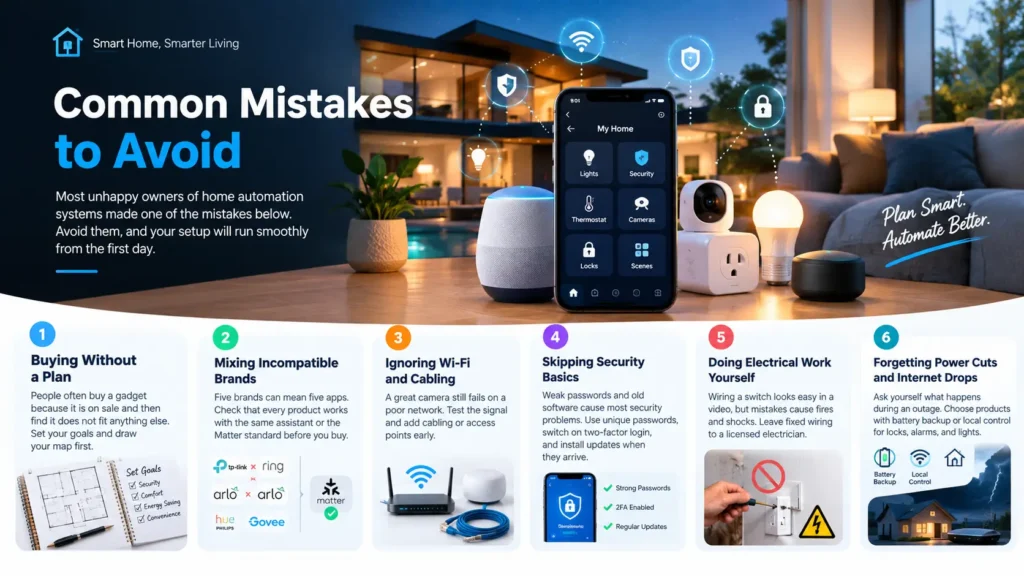
Most unhappy owners of home automation systems made one of the mistakes below. Avoid them, and your setup will run smoothly from the first day.
Buying Without a Plan
People often buy a gadget because it is on sale and then find it does not fit anything else. Set your goals and draw your map first.
Mixing Incompatible Brands
Five brands can mean five apps. Check that every product works with the same assistant or the Matter standard before you buy.
Ignoring Wi-Fi and Cabling
A great camera still fails on a poor network. Test the signal and add cabling or access points early.
Skipping Security Basics
Weak passwords and old software cause most security problems. Use unique passwords, switch on two-factor login, and install updates when they arrive.
Doing Electrical Work Yourself
Wiring a switch looks easy in a video, but mistakes cause fires and shocks. Leave fixed wiring to a licensed electrician.
Forgetting Power Cuts and Internet Drops
Ask yourself what happens during an outage. Choose products with battery backup or local control for locks, alarms, and lights.
Expert Tips for a Smooth Experience
Treat home automation systems as a long-term project, not a one-day purchase. Start small, learn how each part fits your routine, and grow at your own pace. Name every device clearly in the app, such as Front Door Lock or Kitchen Lights. Clear names make voice commands work on the first try. Keep manual switches working wherever you can, so guests and children never feel stuck.
Plan for the future. Add spare data cables and conduit during renovations, even for devices you do not own yet. Review your routines every few months, because your family’s habits change.
Keeping Your System Secure and Reliable
A smart setup needs regular care, just like a car. Update firmware when the maker releases it, replace batteries before they die, and remove old guest codes from your locks. Check camera views after storms or garden changes, because a moved branch can block the picture.
Related Article: 7 Best Smart Home Devices in Australia (2026 Guide)
Conclusion
Home automation systems reward careful planning. Start with your biggest need, choose a type that suits your building, and build on a strong network. Add one group of devices at a time, test each routine, and keep your security habits sharp.
When a job involves wiring, cabling, or alarms, call a licensed professional. If you want a team that handles security, electrical, networking, and smart home work together, Wolftech Groups offers consultation, site inspection, installation, and ongoing support. Call 03 7067 3394 to talk about your home.
Frequently Asked Questions About Home Automation Systems
What are home automation systems?
They are groups of connected devices, such as lights, locks, cameras, and sensors, that work together and respond to schedules, sensors, or your commands.
Do these systems work without the internet?
Some do. Hubs with local control and Zigbee devices often keep basic routines running during an outage. Cloud cameras and Wi-Fi devices usually need the internet for remote viewing and alerts.
Can I add automation to an existing home?
Yes. Wireless devices, smart switches, and hybrid designs let you upgrade an older home without major construction. A site inspection shows which parts suit your walls and wiring.
Is a smart home safe from hackers?
It stays safe when you use strong passwords, two-factor login, regular updates, and a separate network for smart devices. Choose quality brands that release security updates.
Do I need an electrician?
You need a licensed electrician for any work on fixed wiring, such as wall switches and built-in downlights. Plug-in products need no electrician.
Can renters use automation?
Yes. Smart bulbs, plugs, voice assistants, and plug-in cameras need no changes to the property. Ask your landlord before you replace a lock or drill into walls.
How long does installation take?
It depends on the size of your home and the number of devices. A small lighting and camera setup takes far less time than a whole-home system with new cabling. A site inspection gives you a realistic timeline.